Changing the Date That Prints on a Tax Return
Online · Written guide Content date 1 min read
To change the date that prints on tax returns, from the main menu of your Tax Processors Plus Online office, select;
- Configuration
- Office Setup.
- Select an option from the drop down menu
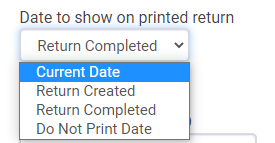
Current Date - Prints today's date in the date fields
Return Created - Prints the date that the return was started in the date fields
Return Completed - Prints the date that the return was marked completed in the date fields
Do Not Print Date - Leaves the date fields blank