How Do I Access Scanned Documents for a Client?
Online · Written guide Content date 1 min read
On this page
Scanned documents can be accessed in the Tax Processors Plus Online program from the main client list or from within a tax return.
Accessing Scanned Documents From the Client List
To access previously scanned documents, or upload new scanned documents from the main client list, locate a taxpayer in the list and select Tools > Scanned Documents:
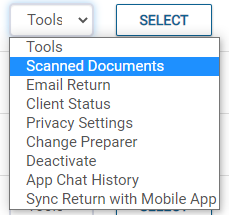
Previously scanned/uploaded documents will be displayed. To upload a new scanned document, select +UPLOAD DOCUMENTS and either drag and drop a file into the field provided, or click and navigate to the scanned document location on your computer.
Accessing Scanned Documents From Within a Tax Return
To access previously scanned documents, or upload new scanned documents from the main menu of the tax return select the dropdown menu next to the taxpayer's name at the top of the screen > Scanned Documents:
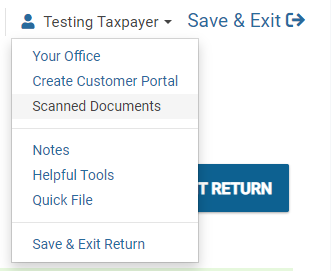
Previously scanned/uploaded documents will be displayed. To upload a new scanned document, select +UPLOAD DOCUMENTS and either drag and drop a file into the field provided, or click and navigate to the scanned document location on your computer.