Flip Active Status in Preparer Menu
Online · Written guide Content date 1 min read
The Flip Active Status option within the Preparer Menu of Tax Processors Plus Online gives you the ability to quickly mark every preparer in your office inactive at the same time. This is a useful tool if you have many seasonal employees. At the end of the season, rather than having to mark each seasonal employee inactive individually, Flip Active Status allows you to do it in one click.
To access the Flip Active Status option, from the Welcome Page of Tax Processors Plus Online click:
- Configuration
- Preparer Setup
- Flip Active Status is at the top
Reminder: Flip Active Status will mark every login in your office inactive, including your own. Before leaving the Preparers menu, ensure that you mark your login active again as well as any other logins you wish to still have access.
Failing to do this step will render your Tax Processors Plus Online office completely inaccessible!
To mark inactive logins active again, change the dropdown next to Flip Active Status to Show All or Inactive: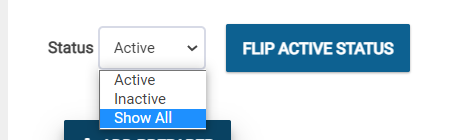
Once the list of preparers appears, use the Active checkboxes on the right-hand side to mark a preparer account active again:

Additional Information: