Return Privacy Settings
Online · Written guide Content date 1 min read
On this page
In Tax Processors Plus Online, a private return requires a password to open the return or access any of its options under the Tools menu in the Client List.
If you are preparing a return that you may not want others in the tax office to see, such as your personal return, then you can create a password for the return in the return's Privacy Settings option.
Marking a return private
To mark an individual tax return private in Tax Processors Plus Online, follow these steps:
- From the Welcome Page select Client Search.
- Locate the return you wish to mark private.
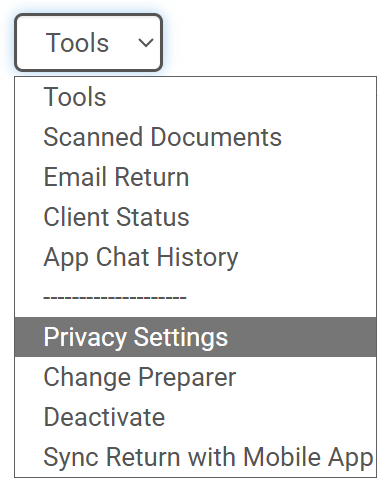
- Select the Tools dropdown menu and choose Privacy Settings:
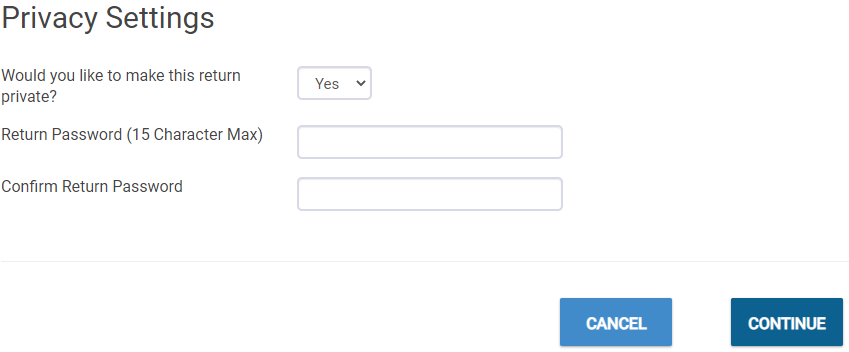
- In the Privacy Settings window, enter the password twice, then select CONTINUE. The password can be from 1 to 15 characters in length and can be anything you'd like.
Removing privacy settings
To remove the password:
- Select Privacy Settings from the Tools Drop down menu
- Enter the password
- Select No as the answer to the question "Would you like to mark this return private?".
- Click CONTINUE.
Restricting the ability to mark a return private
If you have assigned Roles to preparers in your office, the permission setting "Set tax return passwords" controls whether or not the preparer assigned the role can mark a return private.