TaxesToGo User Guide
Desktop · Written guide Content date 1 min read
The TaxesToGo mobile app allows your clients to get their taxes done easier than ever before. It’s as simple as Snap, Send, Sign.
Your taxpayers begin by creating an account through the TaxesToGo mobile application. After their account has been created, they will take snap shots of any documentation required to complete their tax return and send that to you. You then retrieve the information in Tax Processors Plus Desktop to complete the return. Once you’ve completed the return, you send it back to the client for them to review and sign.
The App includes a chat feature for communication between the you and your clients and is fully integrated into your Tax Processors Plus Desktop software. This app is available for both Android and iOS and can be found in Google Play and the Apple App Store.
Setting up your branded mobile app
From inside your Account Hub, you will see TaxesToGo as shown below.
Illustration
The illustration for this step is not available yet. Follow the written instructions.
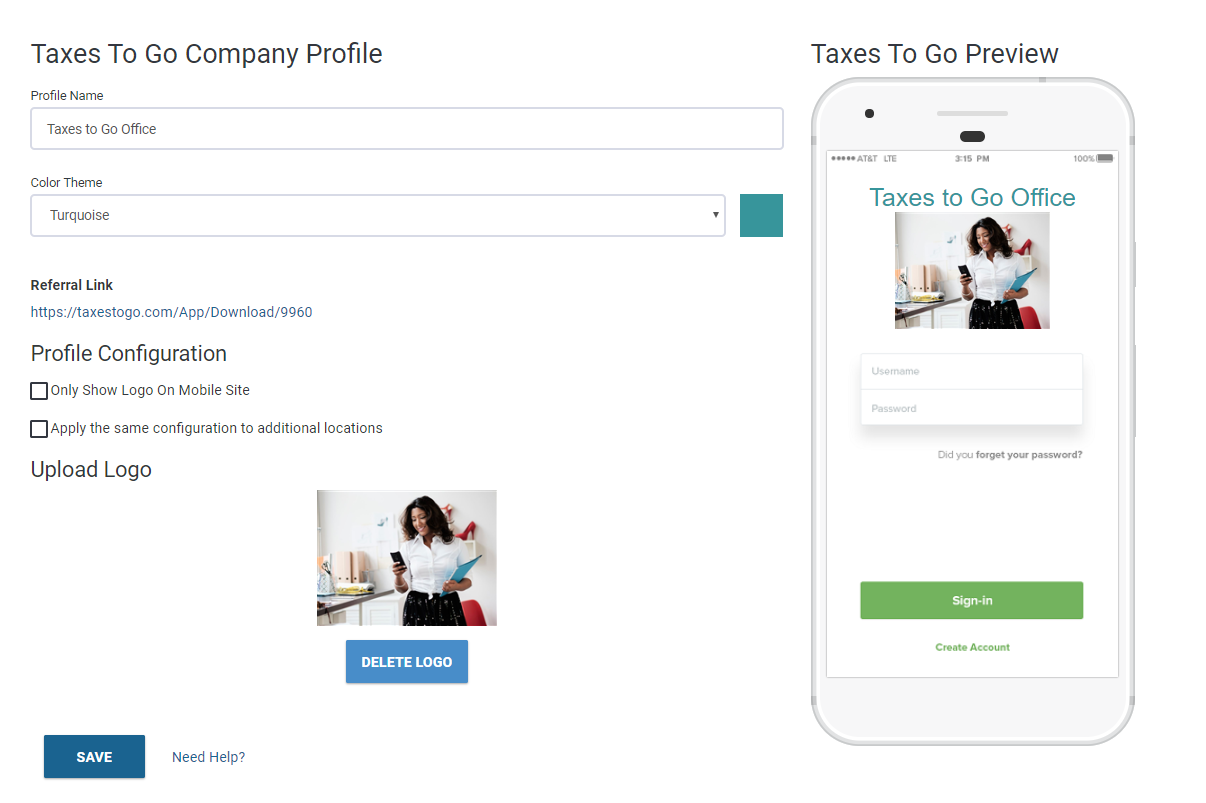
Click View to go the TaxesToGo configuration page. Enter your business name in the Profile Name field, choose a color theme, and optionally upload your own logo. As you make these changes, you will see a preview on the right side of the page.
After you've clicked SAVE on your TaxesToGo configuration, you will see your Referral Link generated. This referral link is what ties your branded app to your office. For your customers to use your branded app, they will need download the app by clicking that link.
Additional Information: