Changing a Return to Spanish
Online · Written guide Content date 1 min read
In Tax Processors Plus Online tax returns can be changed to Spanish from either the Configuration Menu or within a return being worked on.
To change returns to Spanish in the Configuration options, from the main Welcome page select;
- Configuration
- Office Setup
- Default Returns to Spanish
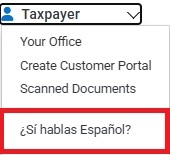
To change returns to Spanish within the return, from any menu in the tax return select;
- Drop down arrow (under taxpayers name in upper right corner)
- ¿Si hablas Español?
Additional Information: