Uploading your IRS EFIN Application Summary in Account Hub (EFIN Verification)
Account Hub · Written guide Content date 1 min read
In addition to other Action Items that may need your attention in Account Hub, the option is now available to upload a copy of your IRS EFIN Application Summary (EAS). EFIN verification is an IRS requirement for all software providers. This is a one time verification for each EFIN and does not need to be completed annually.
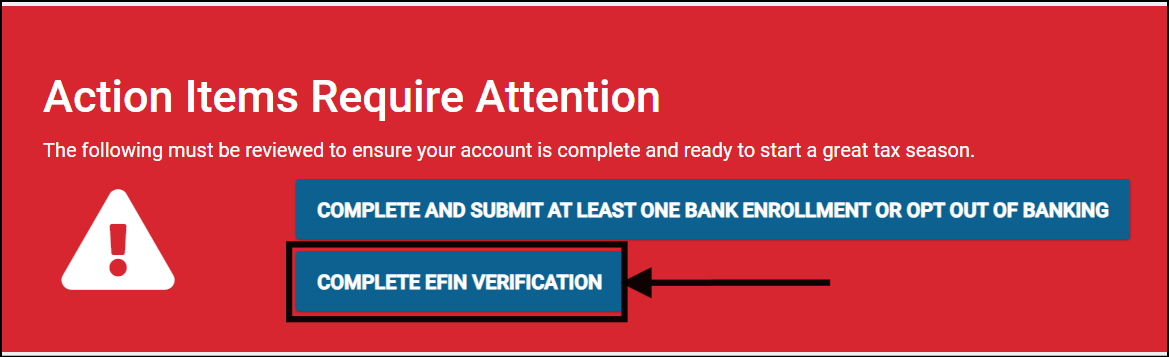
To upload a copy of your EAS, from the Action Items Require Attention section of Account Hub, select:
- Complete EFIN Verification.
You will be prompted to Upload Information. Two reference articles are displayed to assist you in locating the information necessary to complete this process (also included in the Additional Information section at the bottom of this article).
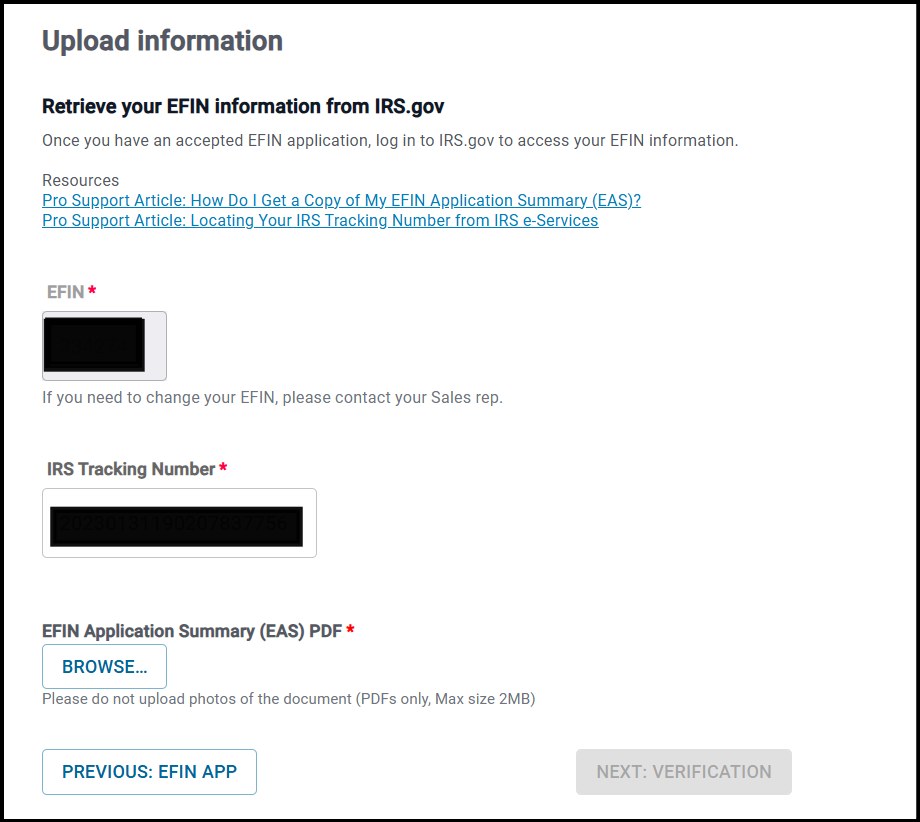
Your EFIN and IRS Tracking Number will pull automatically to this form from Account Hub. To upload a PDF copy of your EFIN Application Summary (EAS), select Browse. Locate the saved PDF file from your computer, select it and select Open. You will be returned to the Upload Information window. Select Next: Verification.
After uploading the EAS, check your account for verification updates. Contact Tax Processors Plus support to confirm its review status and expected processing time.
Additional Information: