Multi-Factor Authentication (MFA)
Desktop · Written guide Content date 2 min read
On this page
The Federal Trade Commission safeguards rule requires tax preparation firms to use multi-factor authentication, (MFA), as does the IRS. Beginning in tax year 2025, Tax Processors Plus Desktop includes MFA.
What is Multi-Factor Authentication?
Tax Processors Plus Desktop authenticates everyone who uses the program by requiring them to enter a username and a password. Multi-factor authentication requires preparers to use a second "factor", in this case a code they obtain either by text message or in their e-mail, to authenticate who they are. This extra level of security will help prevent unauthorized and malicious individuals from accessing the program.
Beginning in tax year 2025, every preparer record in Preparer Setup includes the preparer's MFA credentials, i.e., their e-mail address and mobile number capable of receiving text messages.
Note that a preparer won't be queried for their MFA credentials before 24 hours has passed since the last query.
Setting up a preparer's MFA
When a preparer signs in the first time they will be greeted with the MFA setup window. If their MFA e-mail and mobile number are already entered in their preparer record in Tax Processors Plus Desktop configuration, they will see them here:
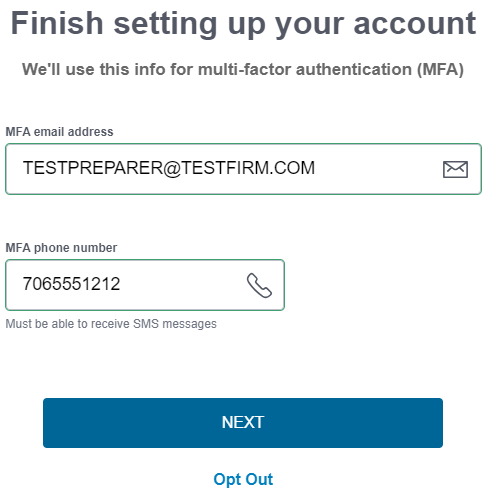
They need to verify the information entered, then select Next.
After selecting Next, they will be given the opportunity to verify themselves by selecting one of the two MFA options:
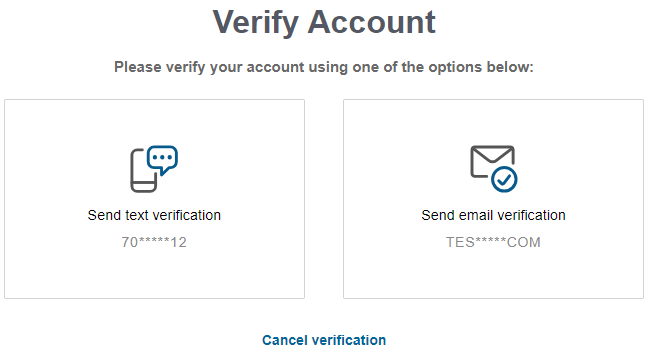
After selecting one of the methods, an MFA code will be sent to them. After entering it, they will be logged in.
Requiring MFA company-wide
The Tax Processors Plus Desktop administrative user can require MFA to be used company-wide. To do this, log in as the ADMIN user. If the ADMIN user's email and mobile number for MFA purposes hasn't been set up, you'll be prompted to set those up.
Once logged in as ADMIN, from the Quick Menu select:
- Configuration
- Firm / ERO / Preparer Setup
- Require Multi-Factor Auth - Select YES. You'll be required to authenticate the change.
Requiring a preparer to use MFA
Initially, preparers aren't required to use MFA. To require it for a particular preparer, from the Quick Menu of Tax Processors Plus Desktop select:
- Configuration
- Firm / ERO / Preparer Setup
- Preparer(s) Menu - Select the preparer.
- Require MFA - Select and choose YES.
You can also verify and change the preparer's email address and mobile number as needed.