How Do I Set Up Printing Options to Print on Both Sides of the Paper?
Software reference · Written guide Content date 1 min read
There is not an option within the Tax Processors Plus Desktop or Tax Processors Plus Online programs to default printing to both sides of the paper as this is not a standard way to print tax returns. Double-sided printing can only be configured through the printer itself.
With the PDF version of the document open to be printed open in Adobe Reader, select File > Print: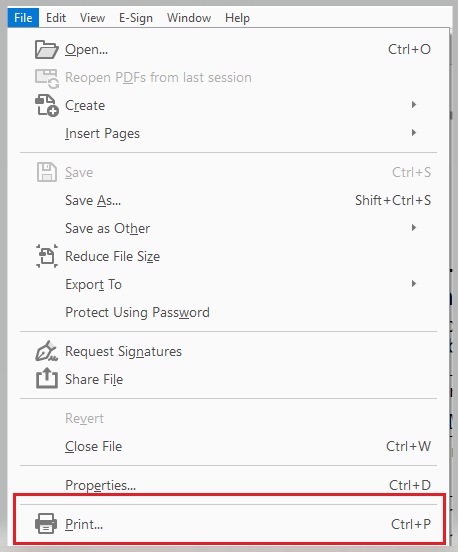
The Print Menu will display on the screen. Click the Print on both sides of paper check box, then select Print:
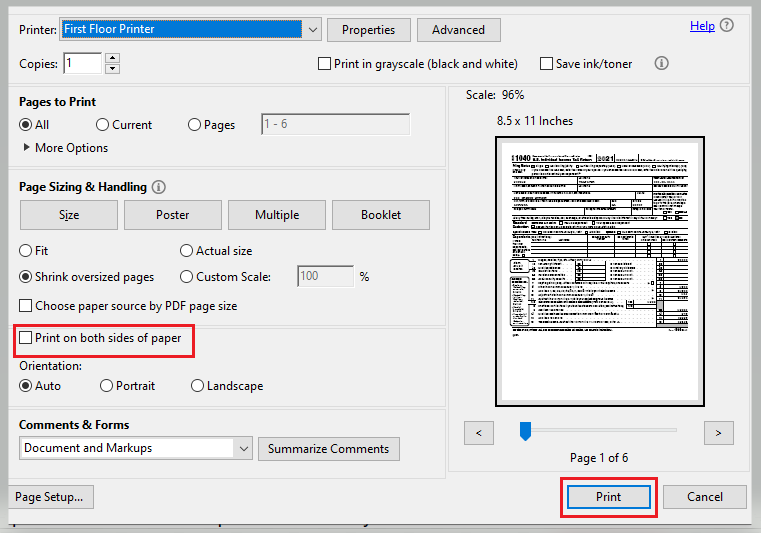
If you aren't seeing the check box, the printer selected at the top is not capable of printing on both sides.
Note: The IRS and state taxing authorities do not accept mailed paper returns that are printed on both sides of the paper. This option should only be used to give a client a copy of their tax return that WILL NOT be mailed to the IRS or state.
Additional Information:
Troubleshooting Printing Problems